
// Notes · Android / Kotlin
Building a Typed Localization API from JSON in Android
How I used generated Kotlin accessors and build-time validation in NotifyBridge, where Android’s own localization system still fits, and what I would improve next.
Android already has a capable localization system. Put strings in res/values/strings.xml, add translations in locale-qualified resource directories, and resolve them with stringResource() or getString(). That is the sensible default for most Android applications.
For NotifyBridge, I explored a different trade-off: keep translations in feature-grouped JSON dictionaries, then generate a Kotlin API from the English dictionary at build time. The goal wasn’t to replace Android’s language-selection experience. It was to make dictionary usage more discoverable in Kotlin and make translation parity a build-time contract.
The app currently bundles English, French, Spanish and Portuguese. Here is how the implementation works, including the limits of the approach.
1. JSON is the source of truth
Each language has a dictionary under app/src/main/assets/localization/<language>/strings.json. Keys are grouped by feature rather than scattered through screen code: common, status, broker, permissions, and so on.
This is a shortened example from the English dictionary:
{
  "common": {
    "back": "Back"
  },
  "status": {
    "queued_notifications": "{count, plural, one {# queued notification} other {# queued notifications}}"
  }
}
English acts as the master dictionary for code generation and validation. The JSON files ship with the application rather than being fetched from a remote translation service.
2. Generate Kotlin accessors instead of hand-writing keys
A Gradle build-logic plugin reads the dictionary model and generates properties or functions for each entry. UI code can then write:
Dictionary.Common.back.localized()
Dictionary.Status.queuedNotifications(
    count = state.outboxDepth
).localized()
This buys a few useful things: IDE completion, compile-time checking of references to generated keys, and named parameters for interpolated values. A plural count is generated as an Int; ordinary interpolation values currently use Any.
That’s an important distinction. The generated API is typed, but not every placeholder has strong domain-specific typing. And Android’s ordinary R.string IDs already offer compile-time key references - this approach adds a feature-grouped Kotlin interface and named placeholder signatures, rather than inventing compile-time safety from scratch.
3. Validate the translations before packaging
Generating accessors from English alone would not tell me whether French or Portuguese had drifted. The companion validator compares every bundled locale against the master dictionary.
Build-failing checks cover:
- Missing or unexpected feature groups and keys.
- Mismatched placeholder names or placeholder kinds.
- Different sets of plural branches, such as
oneandother.
A translation edit that breaks the dictionary’s structure should fail during the build, not silently appear as a broken label when someone opens a particular screen in another language.
This is structural validation, not linguistic proof. It cannot tell whether a French translation is natural, whether a phrase fits a button, or whether the plural rule chosen at runtime is grammatically correct. Those still require review and UI testing.
4. Resolve localized text at the UI boundary
Instead of immediately converting every dictionary reference into a String, NotifyBridge can carry a LocalizedString containing a key and its arguments. The value is resolved against the active Language when text is displayed.
This allows a ViewModel to communicate display text without hard-coding the current language into the state it produces. In Compose, the active language is provided through LocalLanguage; code running outside Compose, including services, can resolve text explicitly using the same resolver.
At runtime, resolution looks up the selected dictionary, then falls back to English for missing entries, and finally to a visible key if necessary. Because build validation normally prevents missing bundled keys, fallback is a defensive measure rather than the intended translation workflow.
5. Keep Android’s app-language selection APIs
A custom dictionary doesn’t mean a custom replacement for the Android language picker. NotifyBridge offers English, French, Spanish, Portuguese and Follow system. It persists the user’s choice, updates the platform’s application locale, and provides the corresponding bundled dictionary to Compose.
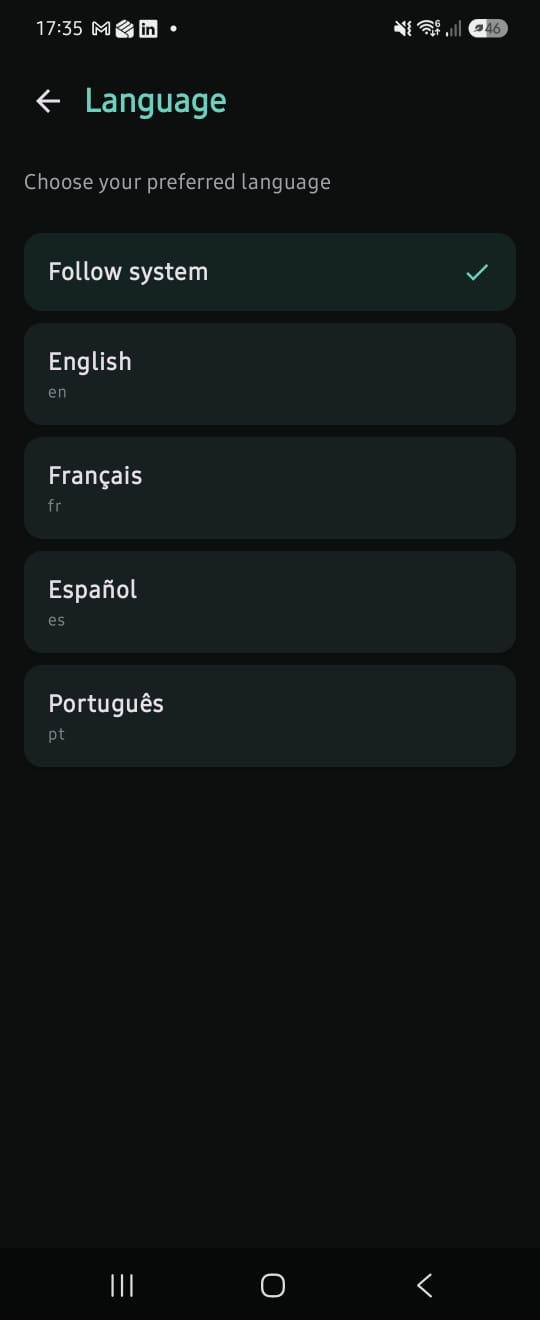
The repository uses Android’s LocaleManager on Android 13+ and AppCompatDelegate.setApplicationLocales() for AndroidX locale integration. Region-qualified tags such as pt-BR currently map to the bundled pt dictionary. Unbundled languages use English as the fallback.
This separation is deliberate: Android owns the app-language preference; the custom layer resolves the application’s JSON strings. It also means keeping the two in sync is a responsibility of the app, not something the standard resource system does automatically for this JSON content.
6. What this approach gains - and what it costs
Scroll the comparison horizontally if needed.
| Concern | Android resources | NotifyBridge JSON + generated API |
|---|---|---|
| Source files | res/values*/strings.xml | Per-language JSON under assets/localization/ |
| Compose usage | stringResource(R.string.back) | Dictionary.Common.back.localized() |
| Key references | Generated R IDs | Generated feature-grouped Kotlin accessors |
| Arguments | Formatting values passed to resource calls | Named generated parameters; plural counts use Int, other values use Any |
| Translation validation | Android tooling and lint checks | Project-specific parity checks that fail the build |
| Runtime resolution | Android resource system | Custom Language resolver |
| Plurals | Locale-aware grammatical categories | Currently count == 1 -> one, everything else -> other |
| Translation updates | Usually distributed with an app release | Currently distributed with an app release |
The largest limitation is pluralization. Android’s resource system understands locale-specific categories such as zero, one, two, few, many and other. NotifyBridge’s runtime currently supports a much narrower branch choice. That is adequate for the limited dictionary patterns I have implemented, but it is not a complete internationalization solution. A structurally valid translation can still be grammatically wrong.
There is also maintenance overhead: a parser, generator, validator, runtime resolver, locale synchronisation, tests and developer documentation. If those costs outweigh the benefit of named accessors and enforced parity, standard Android resources are the better choice.
7. What I would improve next
- Locale-aware plurals: use Android’s resource plural handling or a suitable ICU-based strategy rather than the current English-like
one/otherselection. - Stronger parameter types: where possible, infer or declare types beyond
Anyand validate formatting semantics, not just placeholder names. - Translation quality checks: expand tests for long labels, accessibility text, regional language variants and pseudo-locales.
- A conscious maintenance decision: periodically revisit whether the custom engine still solves a problem that standard resources plus build tooling could solve more simply.
The lesson
For me, the interesting part of NotifyBridge’s localization isn’t that it uses JSON. It’s that translation shape becomes part of the build contract, and localization usage becomes an explicit Kotlin API.
That improves discoverability and catches a useful class of errors early. But the custom layer also takes responsibility for problems Android already solves well - especially plural rules and resource integration. I would choose this architecture again only where its build-time ergonomics justified that extra complexity.
The best engineering decision isn’t always the most custom one. It’s the one whose trade-offs you can explain and continue to maintain.
Source and further reading
NotifyBridge implementation
- English dictionary
- Kotlin API generator
- Dictionary validator
- LocalizedString / StringContent
- JSON resolver
- Locale selection and persistence
Android documentation